

Zapier and Make automation for service businesses
We connect your tools so data is entered once and follow-ups run on their own.
What’s included
- Workflow mapping
- We map your current process and find every step worth automating.
- No-code setup
- Zapier, Make, Pabbly or n8n, configured with error handling built in.
- Custom API work
- JavaScript and webhooks when standard connectors aren’t enough.
- Monitoring and handoff
- Testing, alerts for failed runs, and a clear handover.
Try a workflow
Pick a platform and a trigger, then switch steps on or off. Minutes saved are an estimate.
- When: Website form submitted
- When: Payment received
Estimated time saved: — minutes a week
An estimate: the minutes each step takes by hand, times how often the trigger happens in a typical week.
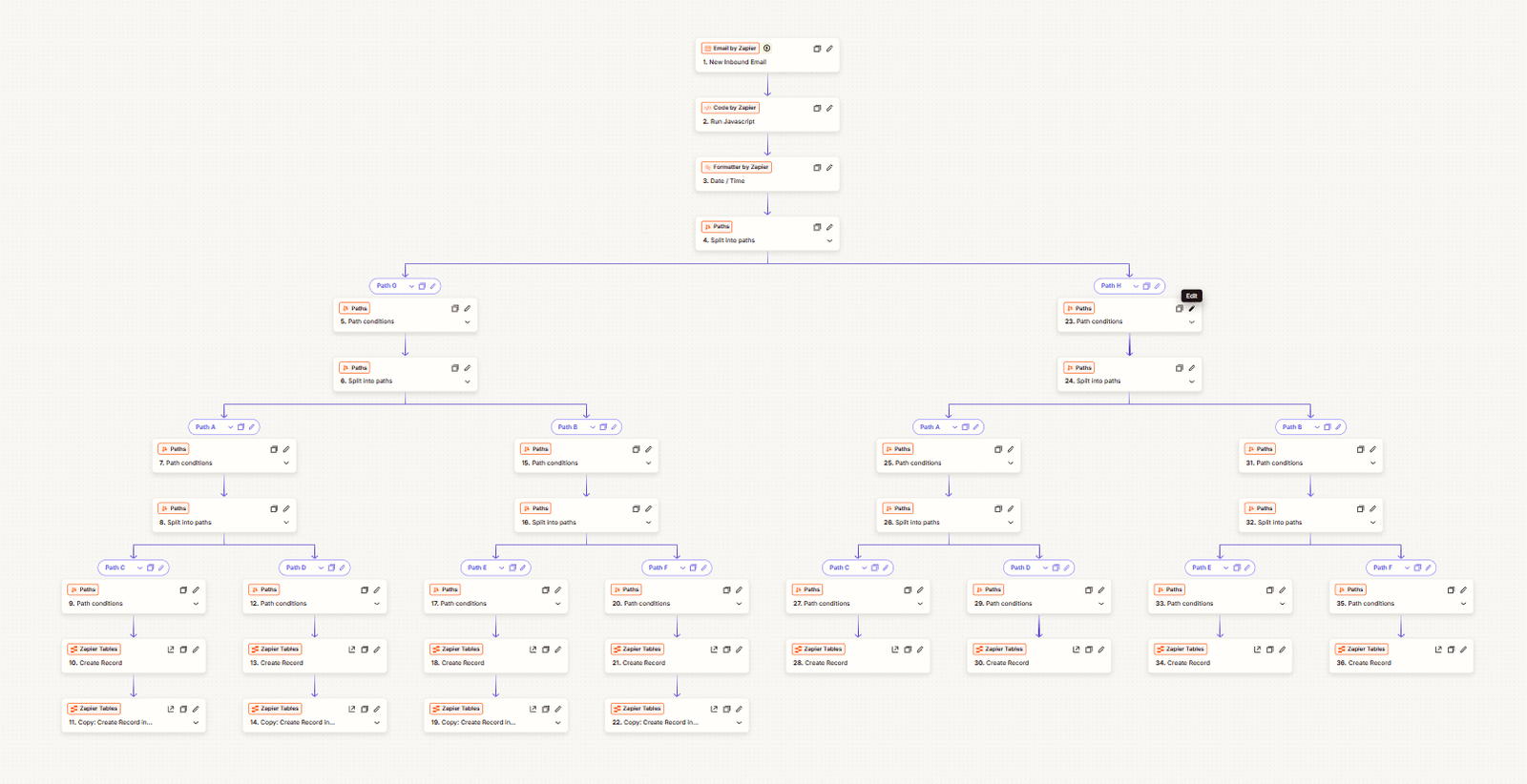
Incoming emails sorted into the right records
One of our Zapier builds. Each new email is read by a short script, its date is formatted, and a set of rules sends it down one of eight paths. Every path creates the right records in Zapier Tables, so nobody copies details by hand.
Works with your SuiteDash system
Most of our automation work connects SuiteDash to the rest of your tools: website forms, accounting, calendars and team chat.
SuiteDash automationHow it works
Discovery
We audit your tools and goals.
Design
We map the logic and the data.
Build
We set up and code the workflow.
Launch
We test, monitor and hand over.
What it costs
Each workflow is quoted as a fixed project once we have mapped the steps. Monitoring and changes can continue on a monthly plan. We scope the work and agree the price before we start.
Questions about workflow automation
Which automation platforms do you use?
Zapier, Make, Pabbly Connect and n8n, plus custom JavaScript, APIs and webhooks when a ready-made connector isn’t enough. We pick the platform that fits your tools, volume and budget, rather than the one we happen to prefer.
Can you fix automations that keep breaking?
Yes. We find out why each one fails, whether it is a changed field, an expired connection or two automations fighting over the same record, then fix it and add error handling so you hear about failures before your clients do.
Do you automate SuiteDash?
Yes. SuiteDash automation is our main specialty, with its own page. This page covers connecting other tools, which often includes linking SuiteDash to your website, accounting software or team chat.
What does workflow automation cost?
It depends on how many tools and steps are involved. We scope each workflow and quote before building, so you know the price up front. Ongoing monitoring and changes can be part of a monthly support plan.
Our other services
Let’s talk about workflow automation
30 minutes. No obligation. You’ll leave with a plan.